

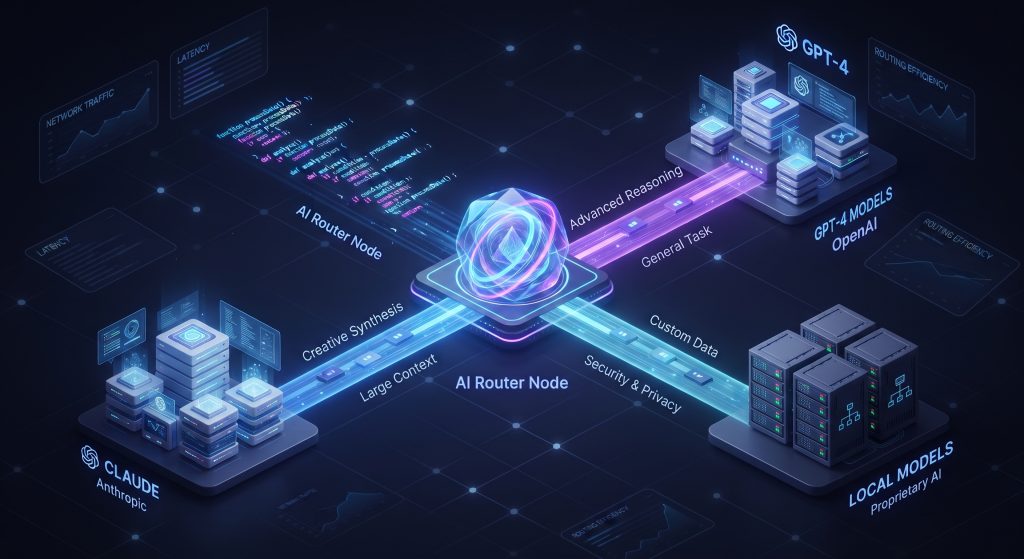
If you use AI coding assistants in your everyday development workflow, you have likely run into two main pain points: waiting for responses to simple questions, and watching your API token usage soar.
Using a top-tier model like Claude 3.5 Sonnet or GPT-4o for every minor edit is like taking a cross-country flight just to visit the corner store. It works, but it wastes time and budget. Dynamic LLM routing solves this problem by introducing a smart traffic controller between your code editor and your AI models.
The Real Cost of Over-Provisioning AI Prompts
Not all coding tasks require deep reasoning or massive parameter counts. Generating boilerplate, fixing a missing semicolon, or writing a basic unit test requires minimal contextual understanding.
When every prompt defaults to a heavy frontier model, developers face two major issues:
-
Unnecessary Latency: Larger models take significantly longer to generate tokens, slowing down interactive coding sessions.
-
Inflated Costs: Running lightweight tasks through expensive APIs consumes token allowances rapidly.
By matching the complexity of each task to the most suitable engine, you preserve budget for high-impact problems like debugging architectural issues or designing algorithms.
How Dynamic Routing Works Under the Hood
Dynamic LLM routing acts as a lightweight middleware layer between your IDE (such as Cursor or VS Code) and your model providers.
// Conceptual prompt complexity router
async function routeCodePrompt(prompt) {
  const complexityScore = evaluateComplexity(prompt);

  if (complexityScore < 0.3) {
    return await callModel('local-coder-3b'); // Fast & local
  } else if (complexityScore < 0.7) {
    return await callModel('gpt-4o-mini');    // Balanced cost & performance
  } else {
    return await callModel('claude-3-5-sonnet'); // High reasoning power
  }
}
When you send a prompt, the routing layer runs a quick assessment based on key indicators:
-
Context Window & Code Volume: Short snippets route locally; massive multi-file inputs go to large-context models.
-
Intent Classification: Direct lookups and syntax checks trigger fast, low-cost endpoints.
-
Task Type: Multi-step refactoring or root-cause error analysis routes to high-reasoning models.
Step-by-Step Implementation in Modern Workflows
Setting up an intelligent model selection pipeline requires three core elements:
1. Set Up an Intercepting Proxy
Configure a local or serverless proxy server (using tools like LiteLLM or custom middleware) that captures outgoing request payloads from your coding tool before they reach external endpoints.
2. Define Routing Thresholds
Categorize your AI tasks into low, medium, and high complexity. Assign cheaper or locally hosted models (such as Llama 3 or DeepSeek Coder) to low-complexity tiers, reserving paid APIs for complex logic.
3. Establish Fallback Logic
Networks fluctuate and local instances can overload. Configure your routing layer with fallback rules so that if a primary target fails or times out, the system automatically escalates the request to the next available tier without interrupting your typing flow.
Best Practices and Strategic Context
Before setting up a custom routing pipeline, consider how your team evaluates code accuracy and model drift over time. You can learn more about assessing performance metrics across model tiers through our detailed breakdown on how to evaluate AI models.
For a complete look at setup steps, open-source proxy configurations, and community routing templates, check out the official project details on GitHub. You can also discover more app updates and software tools in our Chrome Extensions section.
Key Takeaways
Implementing dynamic LLM routing gives software teams full control over performance and spending. By directing simple routine edits to fast, localized models and saving heavy processing for true edge cases, you achieve faster response times and significantly lower operational costs.
Related Stories

DECmate II Workstation: How PDP-8 Powered 1980s Offices
Explore the engineering history of Digital Equipment Corporation’s DECmate II, the compact office computer that carried the legendary…

10 Best Sword Cards in Magic: The Gathering (Ranked)
Equip your deck for victory. We rank the top 10 Sword artifact equipment cards in MTG for Commander,…

The Rise of Anonymous Audio: Unfiltered Real-Time Connection
Why are voice-first anonymous platforms surging in popularity? Discover how removing profile pictures and follower metrics creates genuine…