


A free Chrome extension that shows the CSS, fonts, colours and spacing behind any element, and says it does it without site access or a single network request. We installed it and checked every one of those claims against Chrome DevTools.
By the FutureTechSpot Editorial Team · Published 2026-11-02 · Last verified 2026-11-02 · Methodology
TL;DR
Open Inspector: CSS Inspector, Font Finder & Color Picker is a free Developer Tools Chrome extension by vooskovy that shows the CSS, rendered font, colours, contrast and spacing of any element you hover, and exports a page’s colours, type and spacing as design tokens. It requests only the activeTab and scripting permissions. We tested version 0.0.5 hands-on in Chrome on Linux on 2026-11-02. It made no network requests we could see, and its values matched Chrome DevTools. Overall score: 7/10. Best for: designers and front-end developers who want a fast, hover-first look at how a live page is styled without granting an extension access to every site.
Key facts
| Field | Value |
|---|---|
| Name | Open Inspector: CSS Inspector, Font Finder & Color Picker |
| Developer | vooskovy |
| Category | Developer Tools (Chrome Web Store) |
| Chrome Web Store ID | apiiaenebelbejcjpmbcecikmaahpffd |
| Price | Free, no Pro tier, as of 2026-11-02 (optional “Buy me a coffee” link) |
| License | MIT, according to the listing (no repository link on the listing) |
| Version tested | 0.0.5 (store listing updated October 22, 2026) |
| Chrome Web Store users | 904 (as of 2026-11-02) |
| Rating | 5.0 from 3 ratings (as of 2026-11-02) |
| Size | 95.56 KiB |
| Permissions | activeTab, scripting; no host permissions, no content scripts |
| Account required | No |
| Network requests | None observed in our test |
| How we tested | Hands-on, 2026-11-02, Google Chrome on Linux, 1280×800, on Hacker News, Wikipedia, Stripe, Apple, Linear and W3Schools; values compared with Chrome DevTools |
| Overall score | 7/10 |
| Chrome Web Store URL | chromewebstore.google.com/detail/apiiaenebelbejcjpmbcecikmaahpffd |
| Last verified by us | 2026-11-02 |
The tool that checks the tool
Every CSS inspector extension is, on some level, asking you to trust it over the thing already built into your browser. Chrome DevTools is free, it is right there behind F12, and it does not have a listing page.
Open Inspector’s listing reads less like a pitch and more like a set of terms. No site access. No network requests, “enforced by a script that fails the build.” Fonts “measured rather than read off the stack.” Free, “and it will stay free,” because a paid tier would need a licence check and a licence check is a network request. Even its limits section is called “Honest limits.”
That is a lot of specific promises. Specific promises are nice, because you can check them. And the instrument you would check them with is DevTools, the tool Open Inspector is trying to be friendlier than. So I opened both, side by side, on six sites, and kept score.
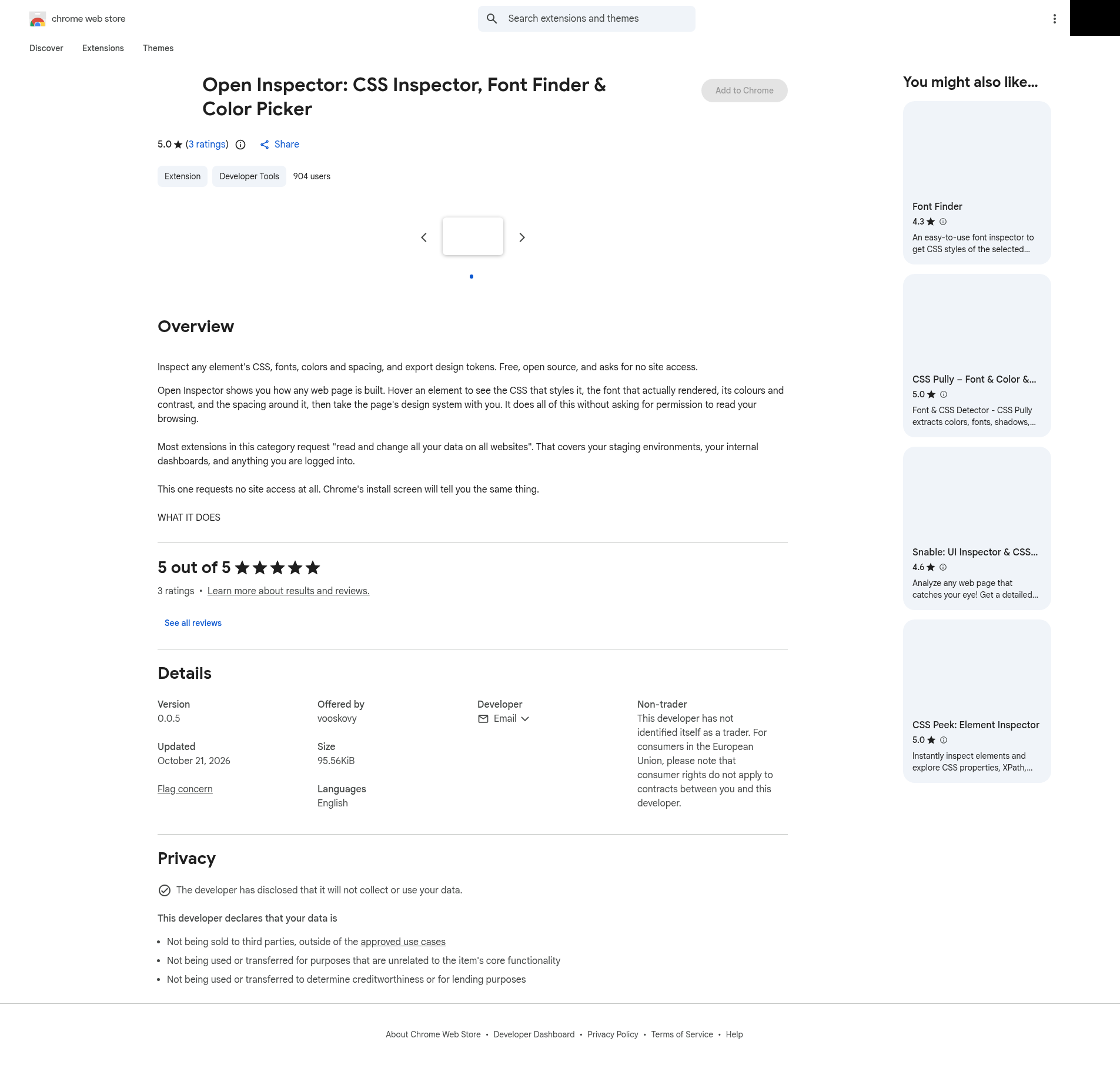
Claim: “Asks for no site access”
What we saw: True, as far as the manifest is concerned. The manifest lists exactly two permissions, activeTab and scripting, with no host permissions and no content scripts. Chrome’s install prompt was a plain “Add Open Inspector?” with no warning list, and Chrome’s own Extensions menu files it under “No access needed.”
activeTab is the polite way to build this. The extension gets access to one tab when you click its icon, and loses it when you navigate away. Nothing runs on a page until you ask it to.
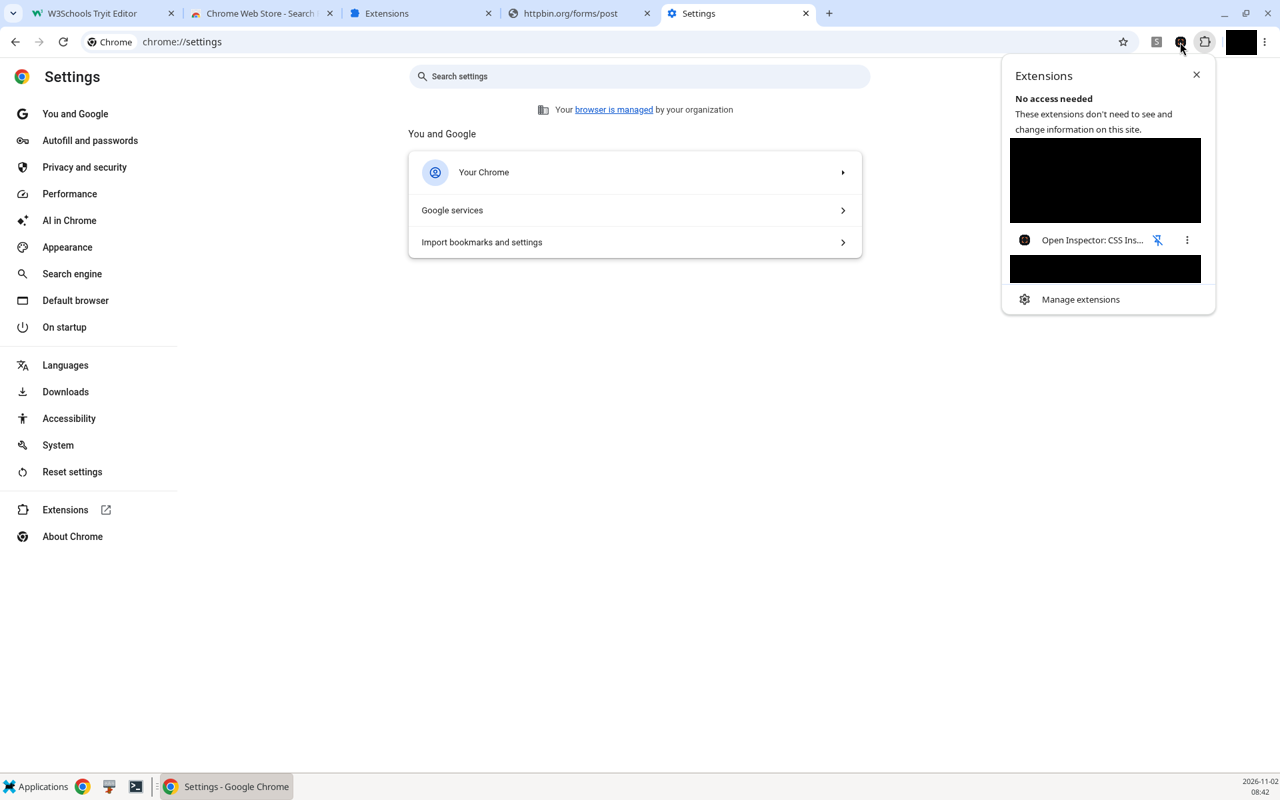
Tip: pin the Open Inspector icon after installing. Chrome tucks new extensions behind the puzzle piece, and the click on the icon is the whole interface. More on why that matters below.
Claim: “Nothing leaves this tab”
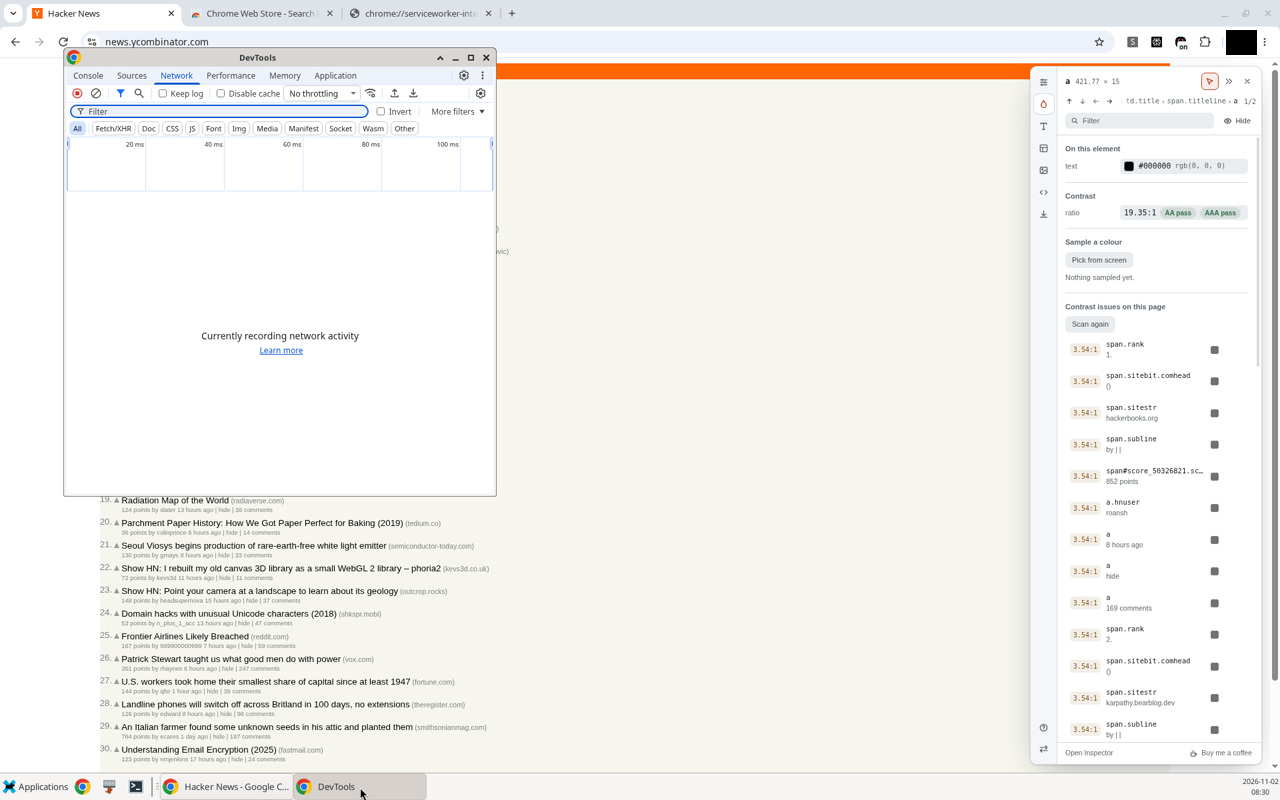
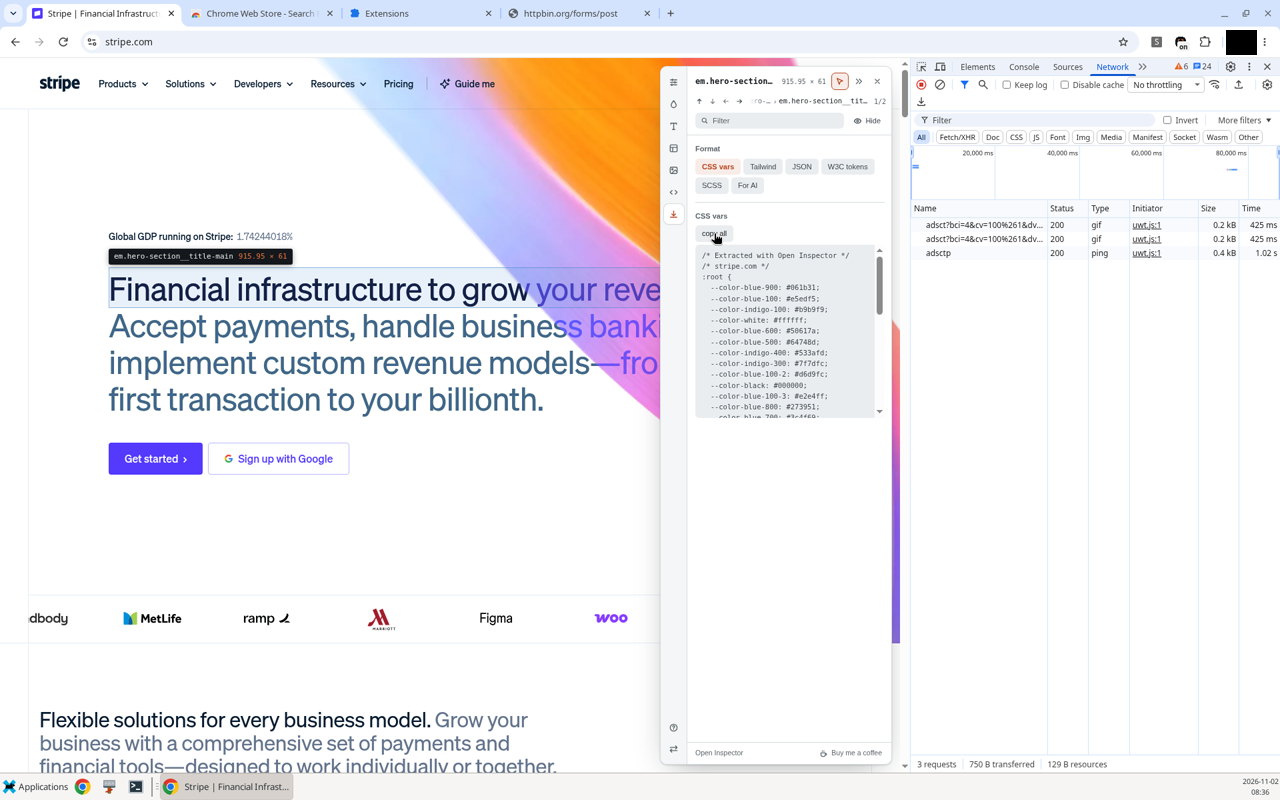
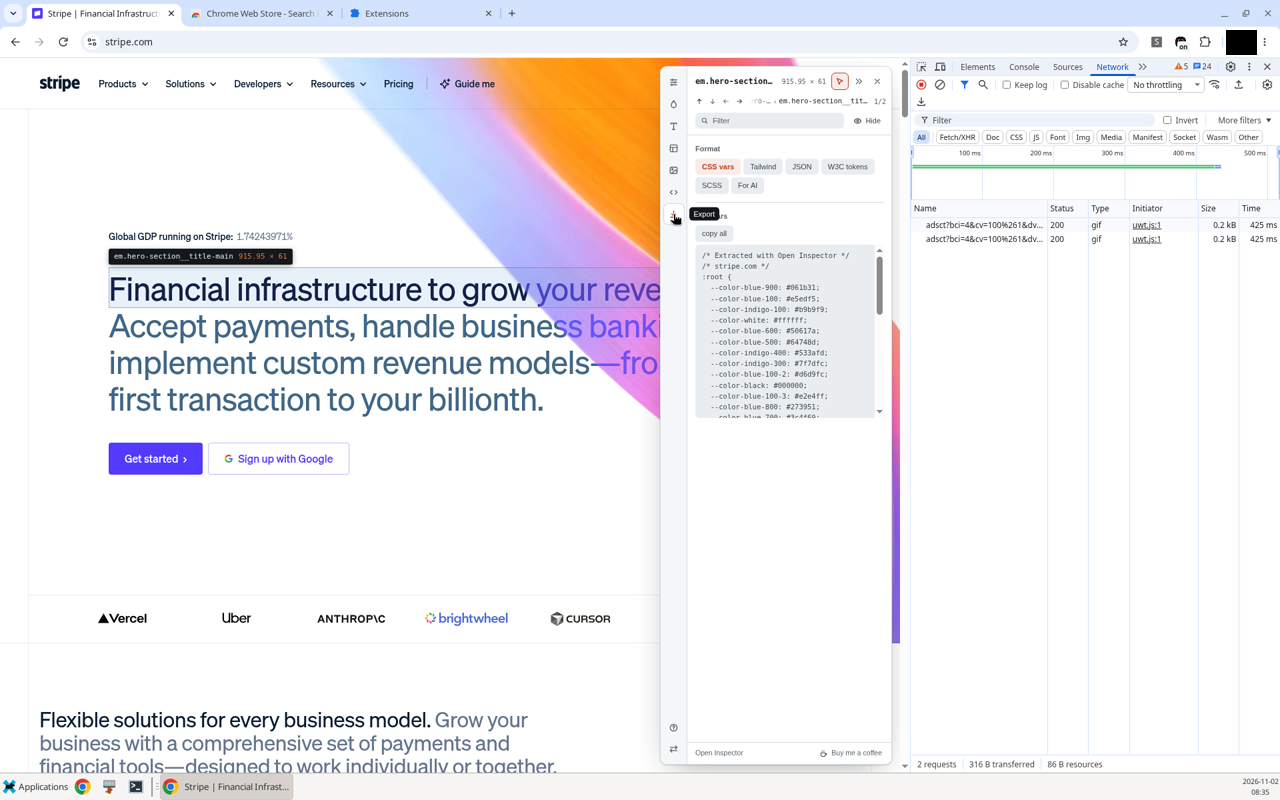
What we saw: Nothing left the tab. I watched two places. The extension’s own service worker had DevTools’ Network panel open the whole time and stayed empty. On stripe.com, I kept the page’s Network panel recording for two to three minutes of heavy use: hovering, every tab, both exports. About 11 requests came through. All of them were Stripe’s own scripts and analytics. None was initiated by the extension.
The exports do not download or upload anything either. “Copy all” puts text on the clipboard, and that is the end of the journey.
It is rare for a privacy claim to be this easy to verify. It is rarer for it to hold up the first time.
Claim: the numbers are right
What we saw: They are, with one flagged exception. I compared Open Inspector against DevTools’ computed styles on nine element and property pairs across Stripe, Apple and Wikipedia:
| Element | Property | Open Inspector | Chrome DevTools | Result |
|---|---|---|---|---|
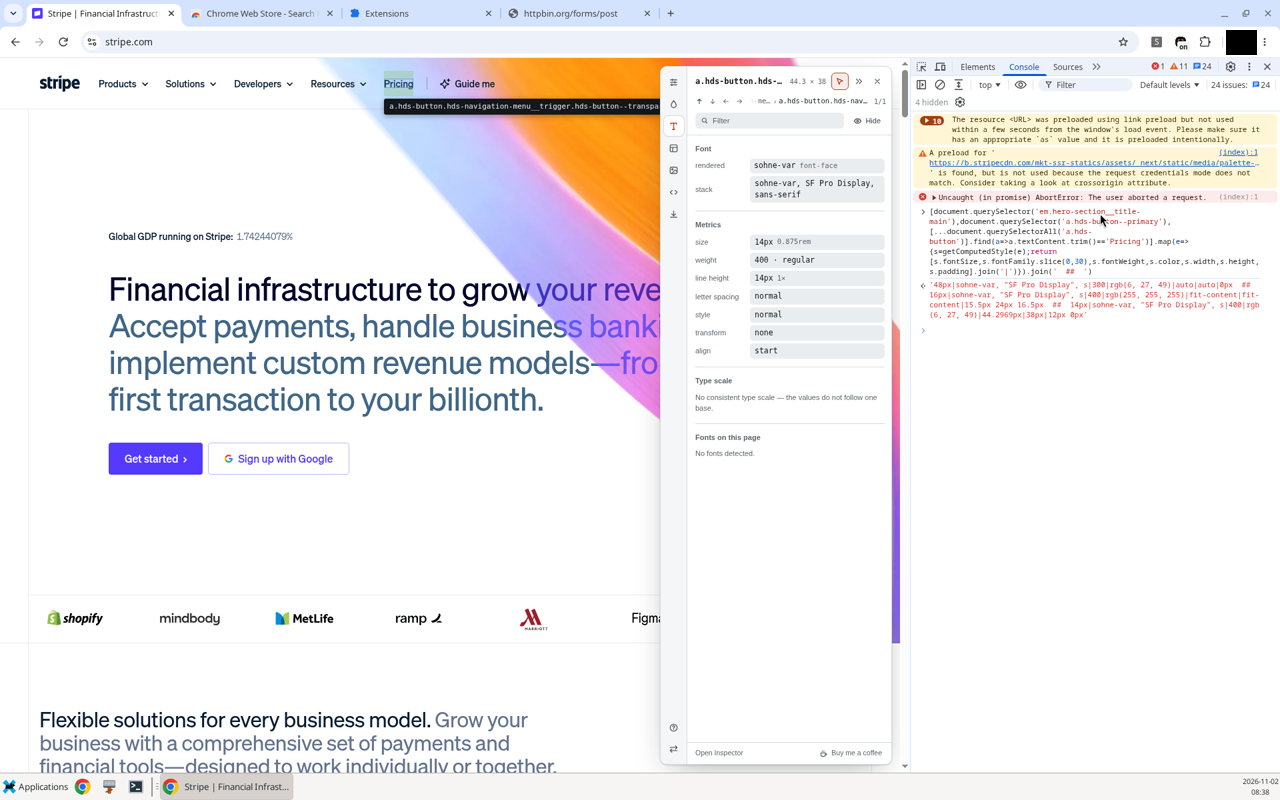
| stripe.com hero text | font size / weight / family | 48px / 300 / sohne-var | 48px / 300 / sohne-var | Match |
| stripe.com hero text | colour | #2d2564, marked “Indeterminate (blend mode)” | rgb(6, 27, 49) | Differs, flagged by the extension |
| stripe.com “Get started” | padding | 15.5px 24px 16.5px | 15.5px 24px 16.5px | Match |
| stripe.com “Pricing” link | size / weight / colour / padding | 14px / 400 / rgb(6,27,49) / 12px 0px | Same | Match |
| apple.com tile link | font / size / letter-spacing | SF Pro Text / 17px / -0.37px | SF Pro Text / 17px / -0.374px | Match (rounded) |
| apple.com “Learn more” | padding / radius / size | 11px 21px / 980px / 130.71×44 | Same | Match |
| apple.com nav “Store” | size / letter-spacing | 12px / -0.12px | 12px / -0.12px | Match |
| Wikipedia table cell | width | 546.81 (header), 533.03 (Spacing) | 533.031px | Match (see below) |
The one colour that disagreed sits under a CSS blend mode, and Open Inspector says so on the spot rather than presenting a confident wrong answer. The Wikipedia width is a labelling quirk: the header shows the element’s bounding box, the Spacing section shows the computed width. Both are correct. Neither says which is which.
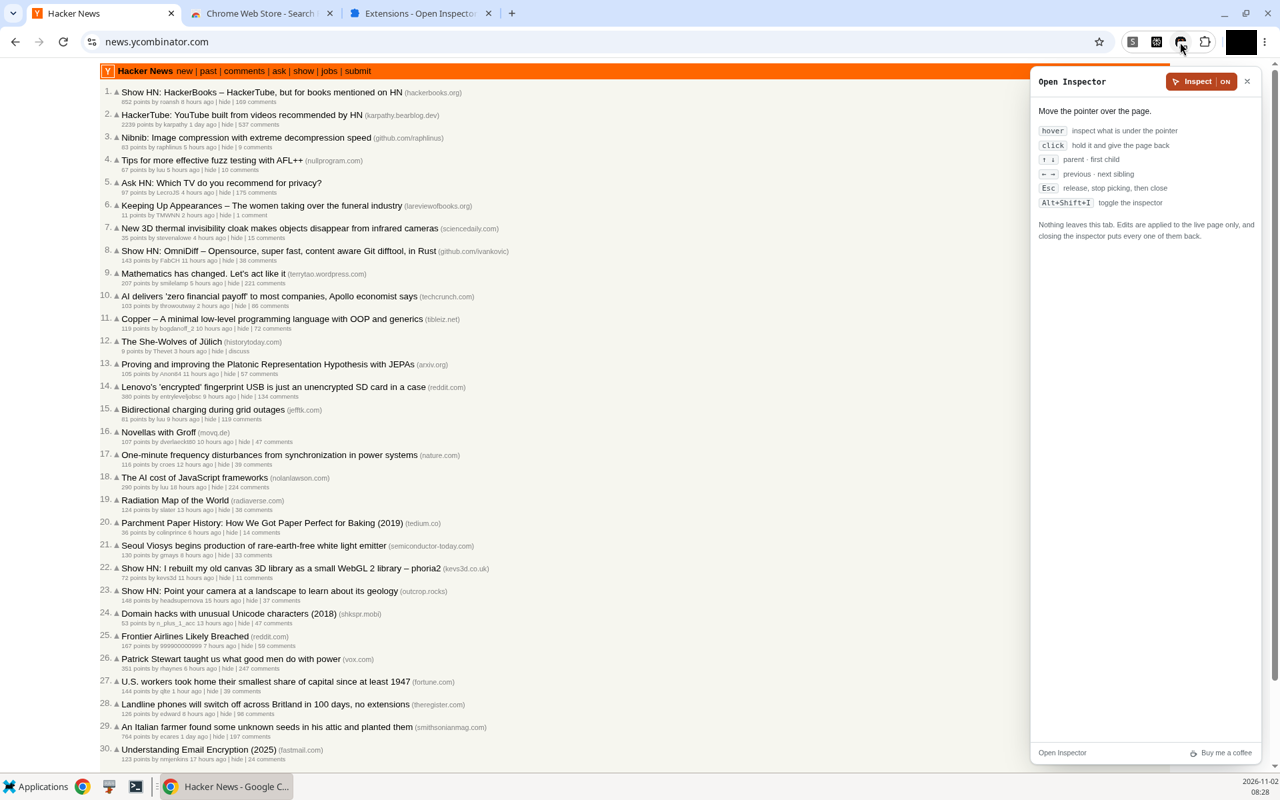
Claim: everything you need, in one panel
What we saw: A lot of panel for 95.56 KiB. Click the icon and a panel docks on the right. Its empty state doubles as a cheat sheet: hover, click to hold, arrow keys to walk the DOM, Esc to leave.
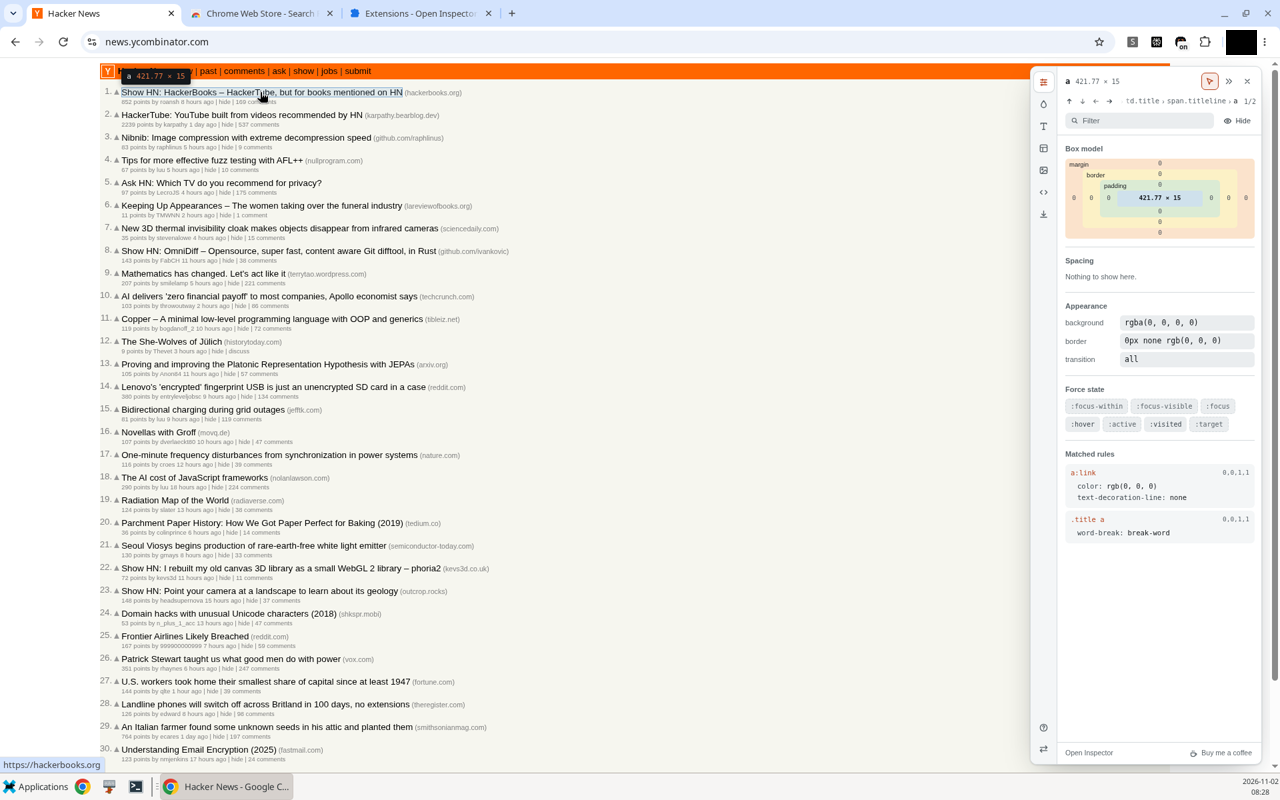
- Styles. Hover an element for its box model, spacing, appearance, force-state chips (:hover, :focus and friends) and matched rules with specificity.
- Type. The font that actually rendered, the stack, the metrics, and a type-scale guess. On Hacker News it called the scale “1.125× (Major Second),” which is more design intent than Hacker News has ever admitted to.
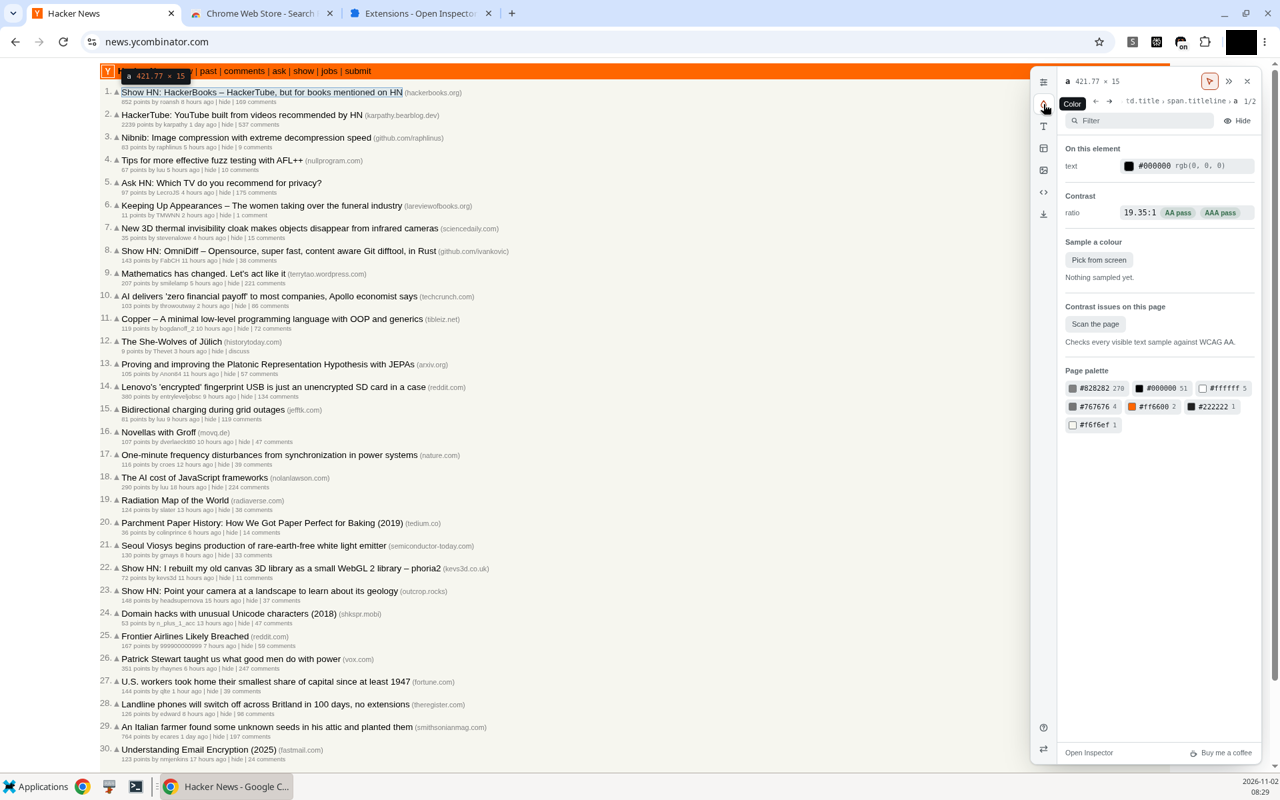
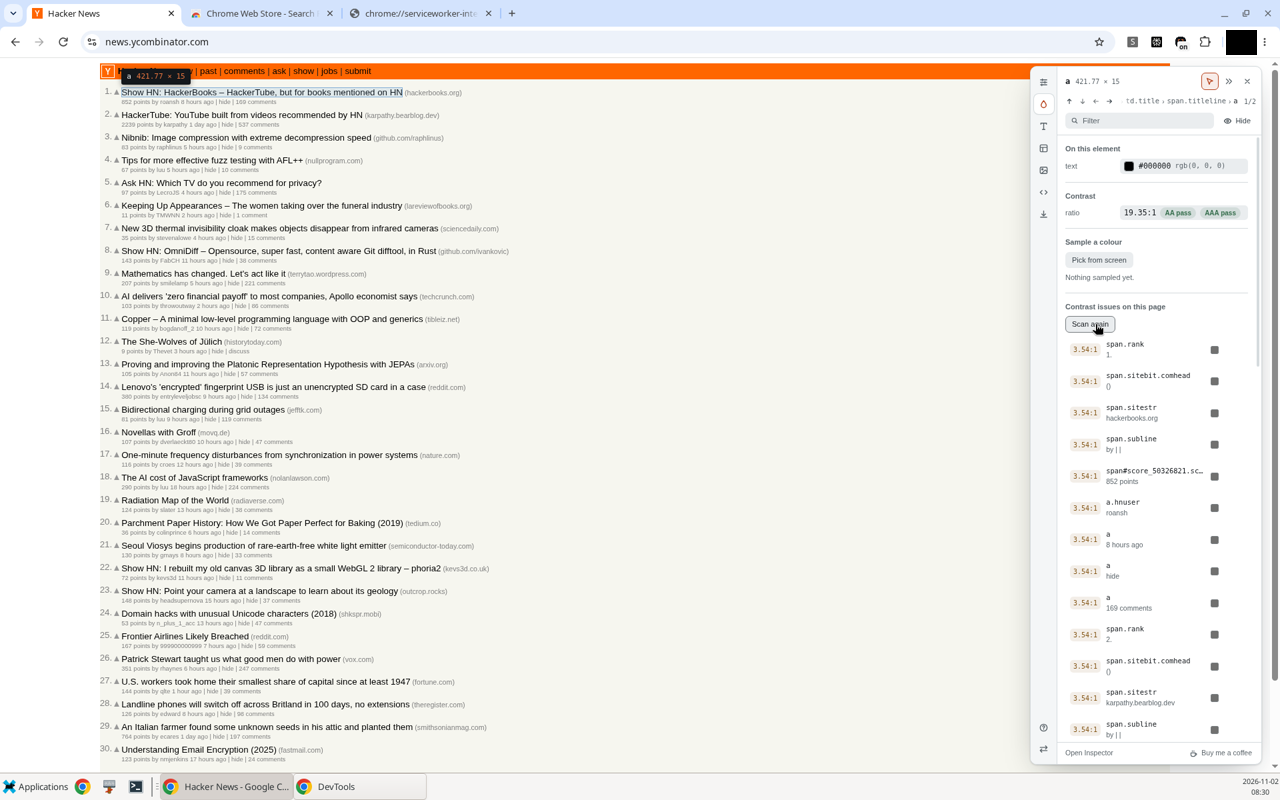
- Color. Text colour with contrast ratio and AA/AAA badges, an eyedropper, a page palette with usage counts, and a page-wide contrast scan. The scan flagged Hacker News’s grey metadata text at 3.54:1, under the WCAG 2.2 4.5:1 minimum for body text.
- Assets. Images and SVGs with sizes, and “copy all URLs.” It declines to bulk-download, and explains that downloading would mean fetching.
- Export. CSS variables and JSON both worked. stripe.com came out as 24 colours and 12 spacing values, half-pixels included. Tailwind, W3C tokens, SCSS and “For AI” formats are also offered. We did not test those four.
Close the panel and the page goes back exactly as it was. Dark sites work too. On linear.app it read translucent colours like #ffffff0d correctly, though the panel itself stays light.
Claim: press Alt+Shift+I
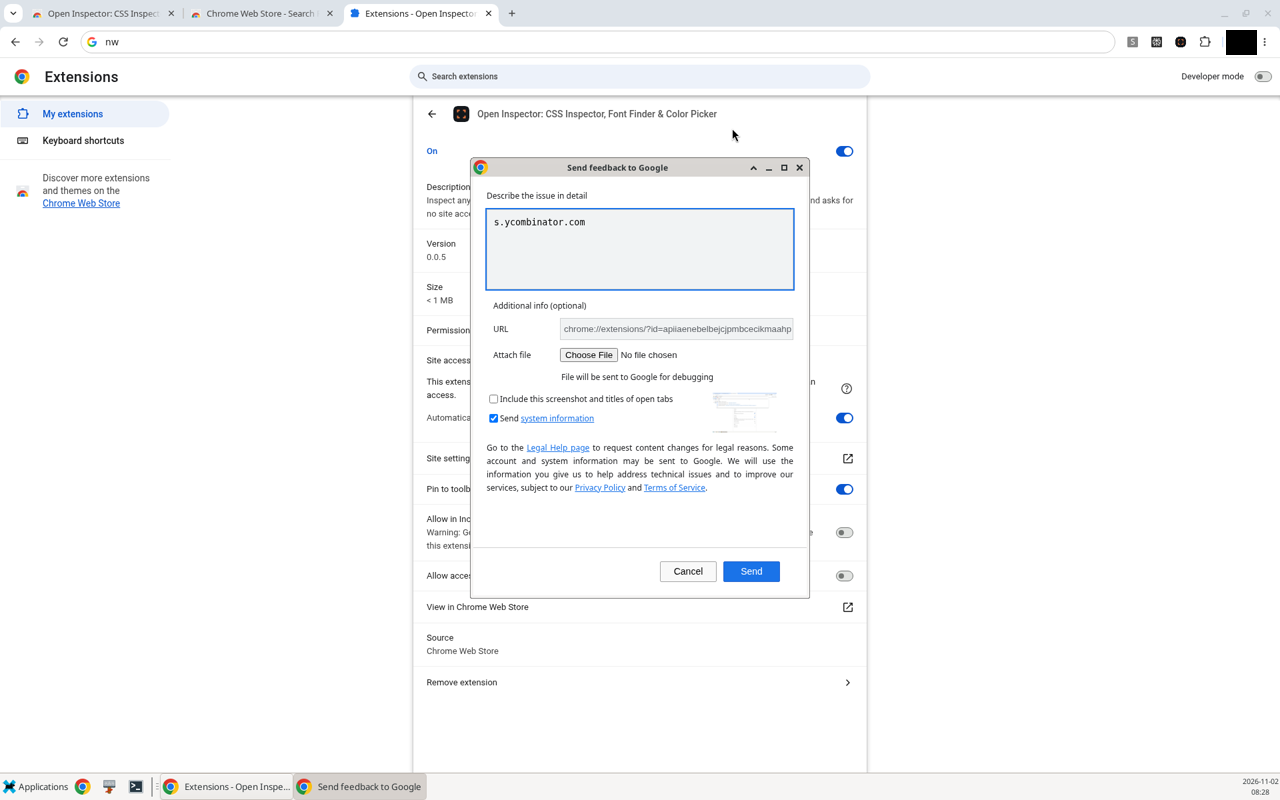
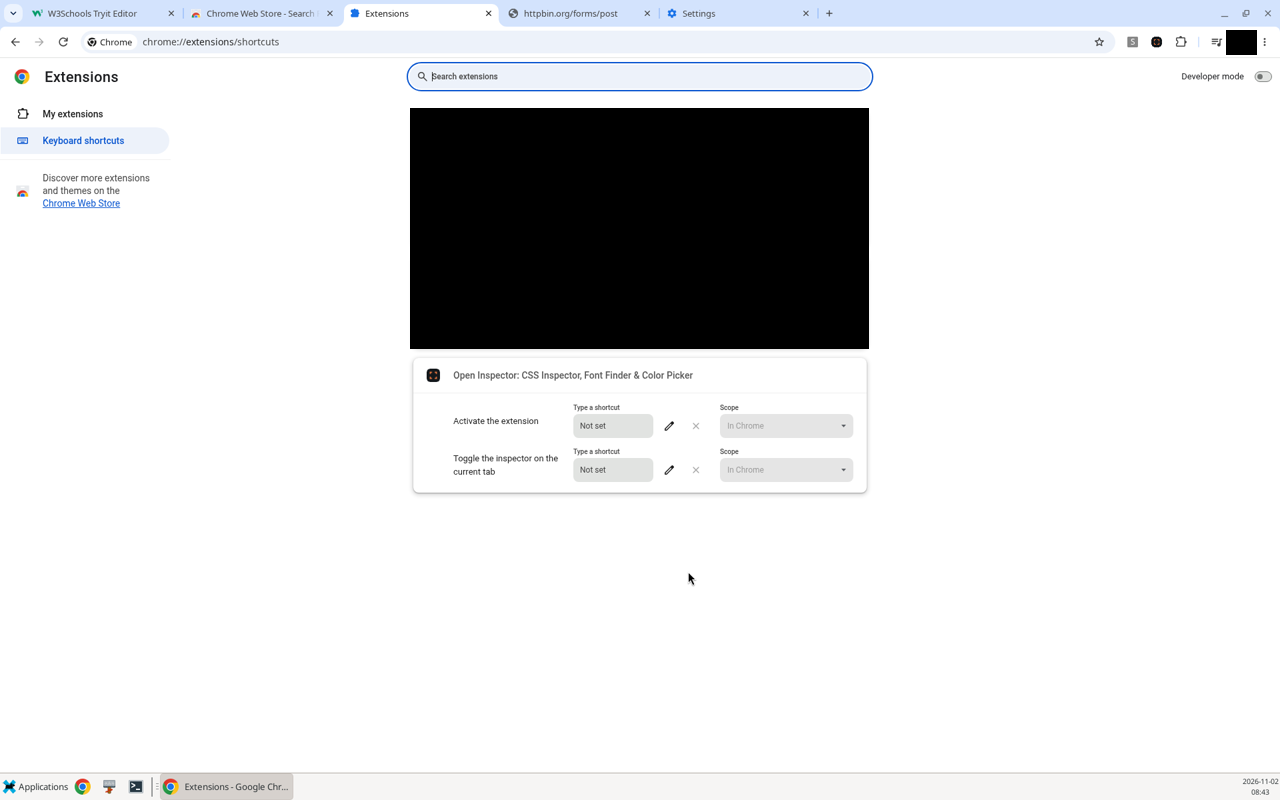
What we saw: Google wants to hear from you. The cheat sheet advertises one keyboard shortcut, Alt+Shift+I. On Chrome for Linux, that key belongs to Chrome’s own feedback form. Pressing it opened “Send feedback to Google,” twice out of two tries. chrome://extensions/shortcuts shows Open Inspector’s commands as “Not set,” because Chrome declined to hand over a key it already owns. Nothing in the extension mentions this.
We only tested Linux. The key may be free on macOS. On Linux, though, the one shortcut the extension teaches is the one that does not work. You can assign your own at chrome://extensions/shortcuts. That is a fine fix. It is also one you have to know about.
Claim: “Honest limits”
What we saw: The limits the listing names are honest. The limits it does not name are quiet.
Named, and handled well: cross-origin stylesheets. Big commercial sites load CSS from other domains, which no extension can read. Open Inspector says “5 cross-origin stylesheets could not be read” instead of pretending no rules matched.
Not named, and silent:
- Restricted pages. On the Chrome Web Store or chrome://settings, clicking the icon does nothing at all. Chrome blocks extensions there, which is fair. The only explanation is a line in the service worker log, which is not where anyone looks.
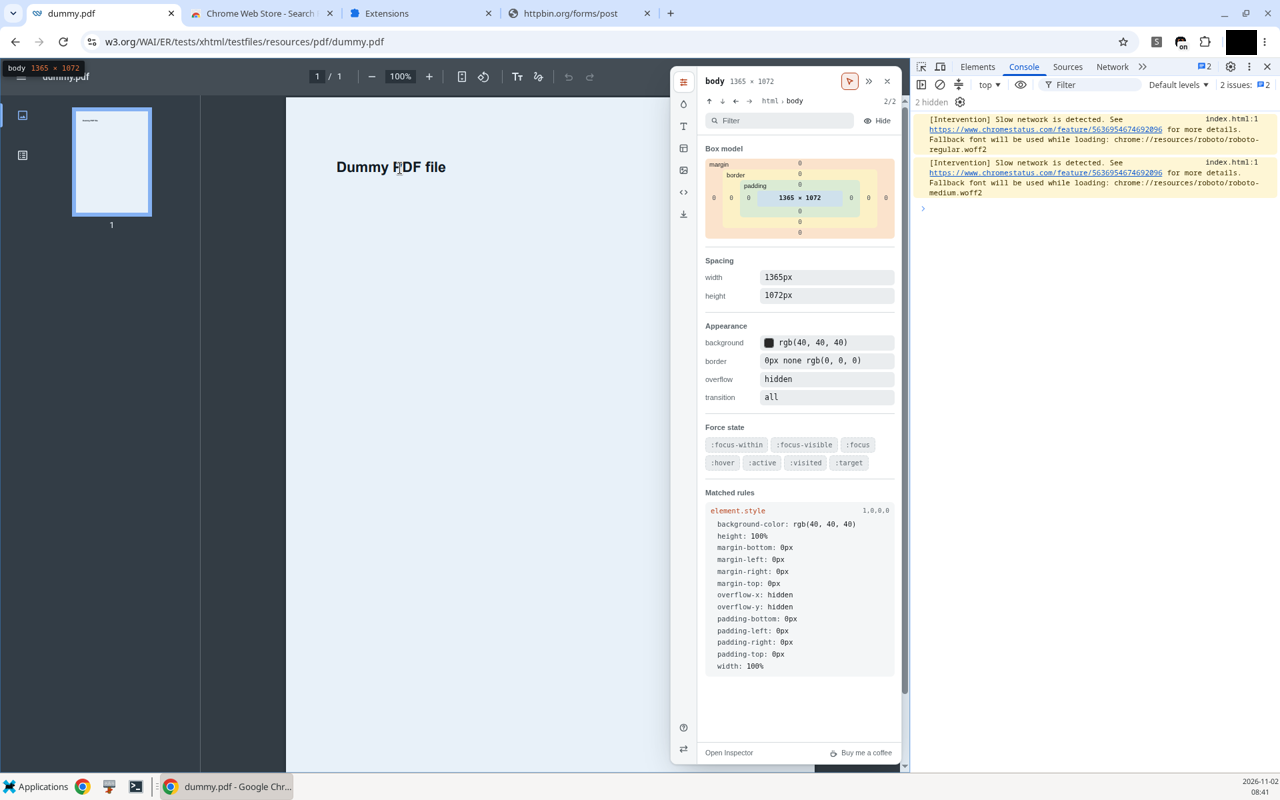
- PDFs. On a PDF, the panel opens and inspects the viewer’s wrapper, a 1365×1072
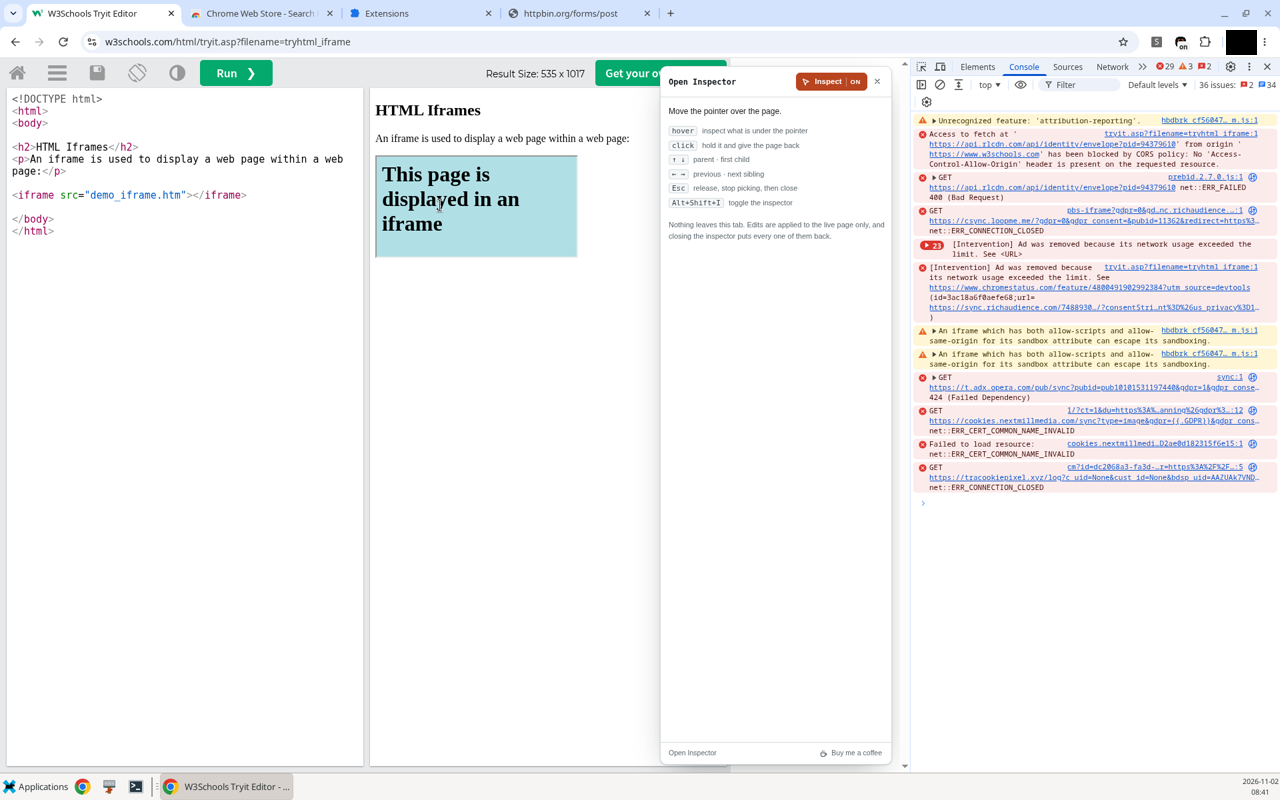
body, not the document. No notice. - Iframes. Hovering inside an embedded frame leaves the panel on its empty state. The page around it works fine.
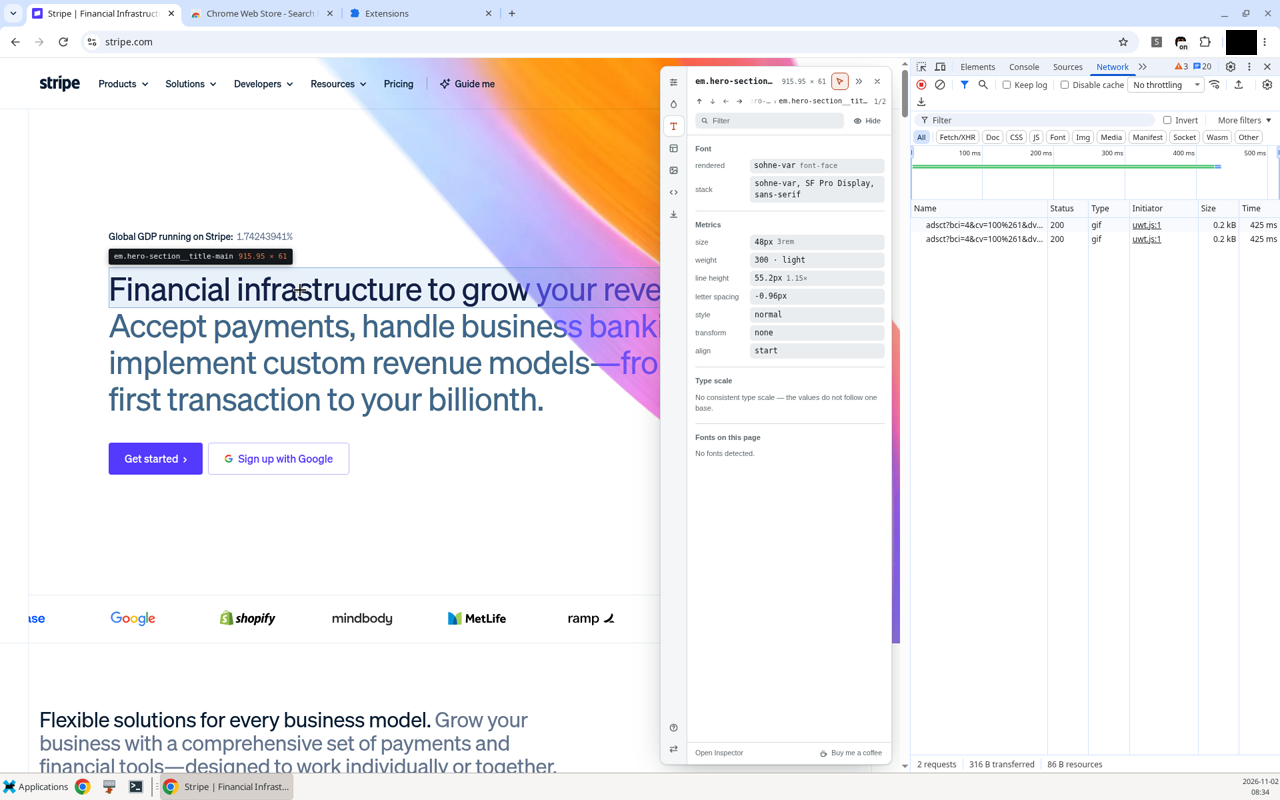
- Fonts on this page. On apple.com it listed every SF Pro face. On stripe.com it said “No fonts detected” while the row above correctly named sohne-var, and the JSON export came out with empty font fields. On Hacker News, which uses the system font Verdana, it also said “No fonts detected.” Arguably correct, but it reads like a shrug. That is two of four big test sites.
None of these is a dealbreaker. Each would be fixed by one sentence on screen.
Claim: “Free, open source”
What we saw: Free, clearly. There is no account, no upsell, and a “Buy me a coffee” link in the panel footer. The listing’s logic for staying free (a licence check would be a network call) is the most convincing pricing argument I have read on a Chrome Web Store page.
Open source, we could not confirm. The listing says MIT licensed and “the whole thing is readable,” but it links no repository or homepage. For an extension whose whole case is “check for yourself,” a repo link is the obvious next line. It is a new listing at version 0.0.5, and that may simply be next.
Pricing
| Plan | Price | What you get |
|---|---|---|
| Open Inspector (only plan) | Free | All features: styles, type, colour, contrast scan, assets, all export formats |
| Optional tip | Voluntary (“Buy me a coffee”) | Nothing extra; supports the developer |
Alternatives
| Tool | Type | Note |
|---|---|---|
| Chrome DevTools | Built into Chrome | Full inspection and debugging; no hover-first summary, palette or token export |
| WhatFont | Chrome extension | Font identification on hover |
| ColorZilla | Chrome extension | Colour picker and gradient tools |
| CSS Peeper | Chrome extension | Visual style and asset inspector for designers |
Verdict: passes its own audit, mostly
Open Inspector makes the kind of promises that usually go unchecked, and it keeps the important ones. It asked for nothing it did not need. It sent nothing anywhere. Its numbers matched DevTools, and the one time they did not, it said so first. For a 95 KiB extension at version 0.0.5, the feature list is generous: type scale, contrast audit, palette, token export, no account and no upsell.
What keeps it at a 7 is the gap between what it says and what it shows you when something does not work. The advertised shortcut opens Google’s feedback form on Linux. PDFs, iframes and restricted pages fail without a word. Font detection comes back empty on sites that clearly have fonts. And the open-source claim is waiting on a link. All fixable, mostly with a line of text.
If you inspect live sites more than you debug them, install it, pin it, and set your own shortcut on day one. Keep DevTools for everything else. It turns out Open Inspector is happy to be checked against it.
Tested on November 2, 2026 with version 0.0.5 in Chrome on Linux.
| Sub-score (hands-on, version 0.0.5) | Score |
|---|---|
| Accuracy vs DevTools | 9/10 |
| Permissions and network behaviour | 9/10 |
| Features | 8/10 |
| Ease of use | 6/10 |
| Edge cases and error feedback (shortcut, PDF, iframe, restricted pages, fonts) | 4/10 |
| Transparency (listing claims vs what we could verify) | 6/10 |
| Overall | 7/10 |
FAQ
What is Open Inspector? Open Inspector: CSS Inspector, Font Finder & Color Picker is a free Chrome extension by vooskovy that shows the CSS, rendered font, colours, contrast and spacing of any element you hover on a web page, and exports a page’s colours, type and spacing as CSS variables, JSON, Tailwind, W3C tokens, SCSS or an AI brief.
Is Open Inspector free? Yes. Open Inspector is free with no Pro tier and no account, as of 2026-11-02. It has an optional “Buy me a coffee” link.
What permissions does Open Inspector need? Open Inspector 0.0.5 requests only activeTab and scripting, with no host permissions. It runs on a tab only after you click its toolbar icon.
Does Open Inspector send data anywhere? In our test on 2026-11-02, Open Inspector made no network requests, both in its service worker and on the page, during two to three minutes of full use on stripe.com. Exports are copied to the clipboard only.
Is Open Inspector accurate? Yes. In our test, Open Inspector’s sizes, weights, fonts, padding and letter-spacing matched Chrome DevTools computed values on Stripe, Apple and Wikipedia. One colour under a CSS blend mode differed, and Open Inspector labelled it “Indeterminate (blend mode).”
Why doesn’t Alt+Shift+I open Open Inspector? On Chrome for Linux, Alt+Shift+I opens Chrome’s “Send feedback to Google” form, so Chrome does not assign it to the extension. Set your own key at chrome://extensions/shortcuts. We did not test macOS or Windows.
Does Open Inspector work on PDFs and iframes? No. On a PDF it inspects the viewer page rather than the document, and it cannot inspect content inside iframes. It also does not run on chrome:// pages or the Chrome Web Store. In our test it showed no message in these cases.
Is Open Inspector open source? The Chrome Web Store listing says Open Inspector is MIT licensed, but as of 2026-11-02 the listing does not link a source repository, so we could not verify it.
Sources
- Hands-on test of Open Inspector 0.0.5, Google Chrome on Linux, 2026-11-02 (FutureTechSpot)
- Chrome Web Store listing: https://chromewebstore.google.com/detail/apiiaenebelbejcjpmbcecikmaahpffd (read 2026-11-02)
- Chrome for Developers, “The activeTab permission”: https://developer.chrome.com/docs/extensions/develop/concepts/activeTab
- Google Chrome Help, “Chrome keyboard shortcuts”: https://support.google.com/chrome/answer/157179
- W3C, WCAG 2.2, Success Criterion 1.4.3 Contrast (Minimum): https://www.w3.org/TR/WCAG22/#contrast-minimum
Change log
- 2026-11-02: First published. Hands-on review of Open Inspector 0.0.5 in Google Chrome on Linux, with values checked against Chrome DevTools. Tailwind, W3C, SCSS and “For AI” exports, and macOS/Windows shortcuts, not yet tested.
FutureTechSpot reviews are independent. We were not paid for this review. See how we test, and our hands-on review of another small-developer Chrome extension, Umbra Mail.
Related Stories

Ad Block Ghost Review 2026: Pin the Ghost. Friday Night Gets Quiet.
A free 4MB Chrome blocker for fake download buttons and streaming pop-ups, with YouTube off until you ask.
Deepmark Review 2026: Finding the Reel That Never Said Pasta
A paid Chrome listing that wants to search the save you cannot name. We did not find the…
Bookmarks But Better Review 2026: Moving the Graveyard to the New Tab
Bookmarks But Better review 2026: a free, open source Chrome new tab that shows your bookmarks as folder…